Avanbox Ecosystem · Businesses

Invoices that pass into your ERP on their own. And all your documents, in order.

In many companies, the data from every supplier invoice and every delivery note is still keyed by hand into the ERP, the company's management software. Documents are scattered across email, shared drives, OneDrive and paper, and contracts, insurance policies and certificates expire without anyone seeing it coming.

Avanbox reads the invoices, passes them to your ERP together with their purchase order and delivery note, and keeps every document in its case file. It is a document manager: it does not replace your ERP, it complements it.

The Avanbox ecosystem In the centre, the Core document manager. Connected to it, the Nova portal, Astra for invoices and the company's ERP. Around them, loose documents coming into the system. Core Nova Supplier and customer portal Astra Invoice reading and reconciliation Your ERP connected via API
The ecosystem

Core at the centre, connected to your ERP

Avanbox is Documelia's application. At the centre is Core, the document manager; around it, Nova and Astra; and all of it connected to the ERP your company already uses.

Diagram of the Avanbox ecosystem Core, the document manager, in the centre. To its left, Nova, the portal that suppliers and customers come in through. To its right, Astra, which reads invoices and reconciles with the bank. Below, the company's ERP, connected via API, and Aura as the suite's own alternative ERP. A single installation serves every company in a group. ONE INSTALLATION FOR EVERY COMPANY IN THE GROUP API The portal Suppliers drop off invoices and customers receive the company's, well organized. The document manager Case files, workflows and archive. Invoices and the bank Two cross-checked AI readings, a matching screen and bank reconciliation. Suppliers and customers enter via the portal Your ERP API integration with any ERP Your bank connected through a service Aura the Avanbox suite's own ERP, if you prefer
Your company has already invested in its ERP. Don't change it: make it more powerful.

Avanbox integrates via API—a direct connection between programs—with any ERP. It complements it; it does not replace it.

Groups of companies

A single installation for all the companies in the group, with permissions per company and per user.

And if you are not happy with your ERP…

Aura, the Avanbox suite's own ERP.

Featured case

Supplier invoices: into your ERP without keying them in

Nova · Astra · Core · ERP

Situation
Supplier invoices arrive through different channels, and someone keys them into the ERP by hand and then looks for their purchase order and delivery note.
What Avanbox does
Invoices arrive through Nova or by email, are read by the two artificial intelligences, are reviewed on Astra's matching screen and pass to the ERP linked to their purchase order and delivery note.
Result
Invoices go into the ERP without being keyed in, each one alongside its purchase order and delivery note.
  1. Nova or emailthe invoice arrives
  2. Two AIsread it and cross-check
  3. Matching in Astrareviewed and validated
  4. Your ERPwith order and delivery note

When an invoice is validated on its own. Only when both conditions are met at the same time: the supplier is on the allowlist and the two readings agree. In any other case, a person reviews the invoice in Astra.

Out of 7,200 invoices in very different formats, only 6 needed a manual correction of any extracted data.

Goods receiving

Receiving at the loading dock

Configured for your company

Situation
Companies with a receiving dock and a wide variety of items, where every delivery note received has to be checked against its purchase order.
What Avanbox does
We configure for your company a screen that matches purchase orders against the delivery notes received. It is not an off-the-shelf screen: it is set up according to how each customer receives goods.
Result
Less time and fewer errors when receiving goods.
A purchase order matched against the delivery note received, line by line ORDER DELIVERY NOTE
Core

Core: case files for paperwork-heavy processes

A case file is a special folder that brings together everything about one case. Every sector has its own:

The more paperwork a process involves, the more it pays to have every document in its place, with its data, its alerts and its history.

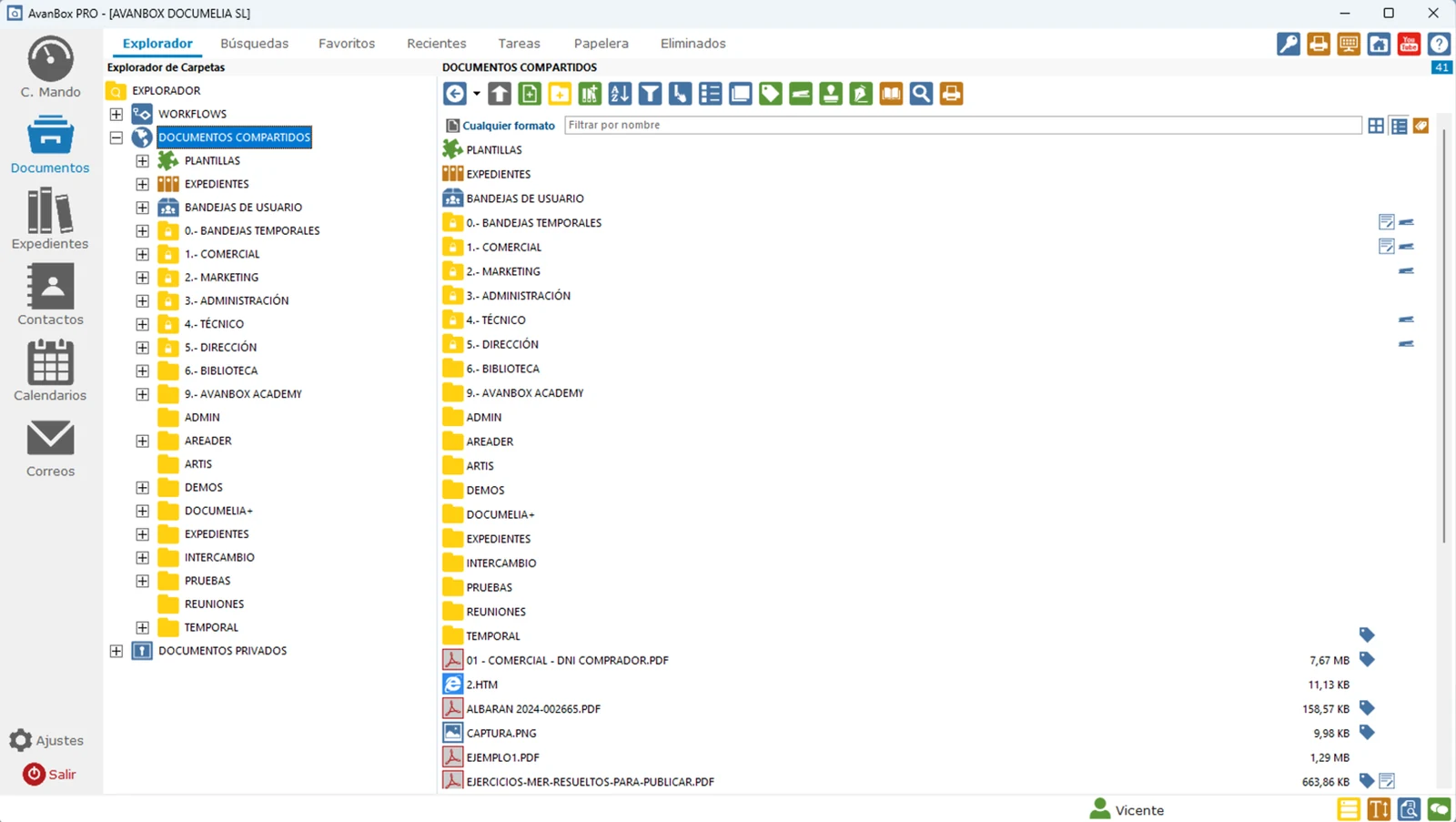
Main screen of Avanbox Core (interface in Spanish): on the left, the folder tree, with workflows, templates, case files and user trays; on the right, the contents of the folder, with its documents and tags
It looks like Windows Explorer. Folder tree on the left and contents on the right: users start working from day one. Interface shown in Spanish.
  • Patterns and pending documents: when you register an employee or a customer, placeholders are created at once for the documents that are needed (ID, contract, data protection…), and you can see at a glance what is missing.
  • Tags and schemas: every document carries its data (customer, date, amount…) and can be found by it or by any word inside it, thanks to text recognition.
  • The “stapler”: links an invoice to its purchase order, its delivery note or its contract, without duplicating files.
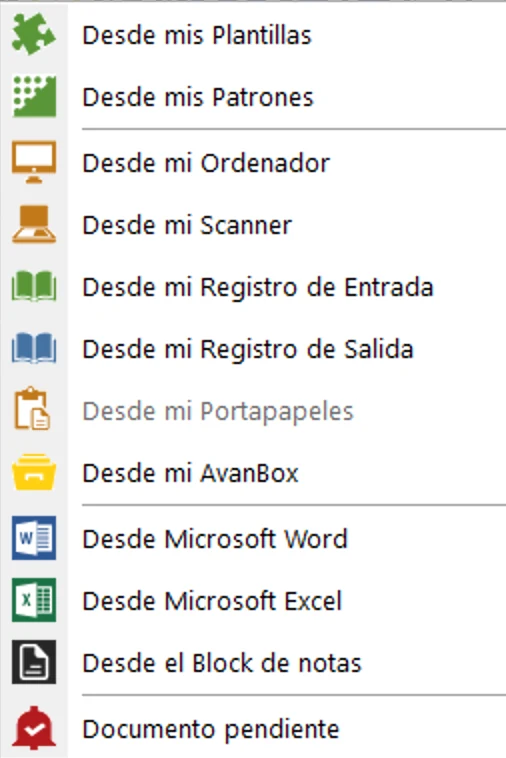
New document menu in Avanbox Core (interface in Spanish): from my templates, from my patterns, from my computer, from my scanner, from the incoming or outgoing register, and pending document
New document: from a pattern, from the scanner or as a pending document. Interface shown in Spanish.
Specific cases

Expiry dates, email, paper and signature

Four more cases, from the situation to the result.

Expiry dates under control

Alerts by email and SMS
Situation
Contracts, insurance policies, supplier certificates, the fleet's vehicle inspections, authorizations: documents with an expiry date scattered all over the company.
What Avanbox does
The system detects that something is about to expire and alerts the person responsible by email and SMS. The document is renewed and stamped as validated.
Result
Expiry dates stop slipping through, and everything is recorded.
  1. About to expire
  2. Alert to the person responsible
  3. Renewed
  4. Stamped as validated
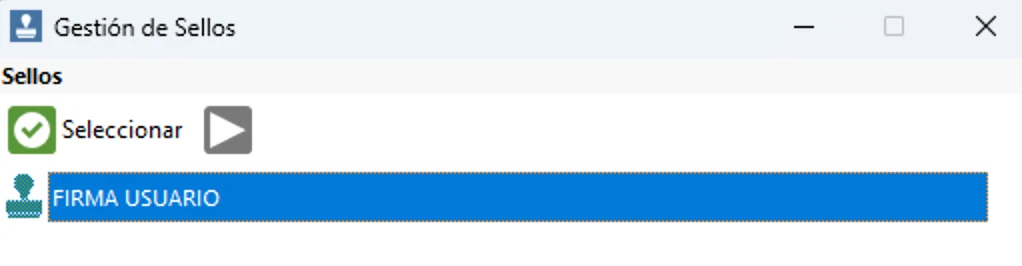
Stamp management window in Avanbox Core (interface in Spanish), with a stamp selected to apply to a document
Stamp management in Core. Interface shown in Spanish.

Email, into the case file

A single searchable PDF
Situation
Much of the history of a case is in email: messages back and forth, with their attachments, in each person's mailbox.
What Avanbox does
An email thread with its attachments is saved as a single searchable PDF inside the case file.
Result
The whole conversation stays in the case file, next to the rest of the documents of the case, and can be searched.
A thread of several emails with attachments becomes a single PDF inside the case file PDF CASE FILE

Paper and folders that file themselves

Bulk scanning · Synced folders
Situation
Piles of paper waiting to be filed and documents arriving every day, which someone has to read, classify and save one by one.
What Avanbox does
Bulk scanning with QR separator sheets, which mark where one document ends and the next begins. And synced Windows folders: just drop a document into them and it is read, classified and sent to its case file.
Result
Paper and files reach their case file without being filed by hand.
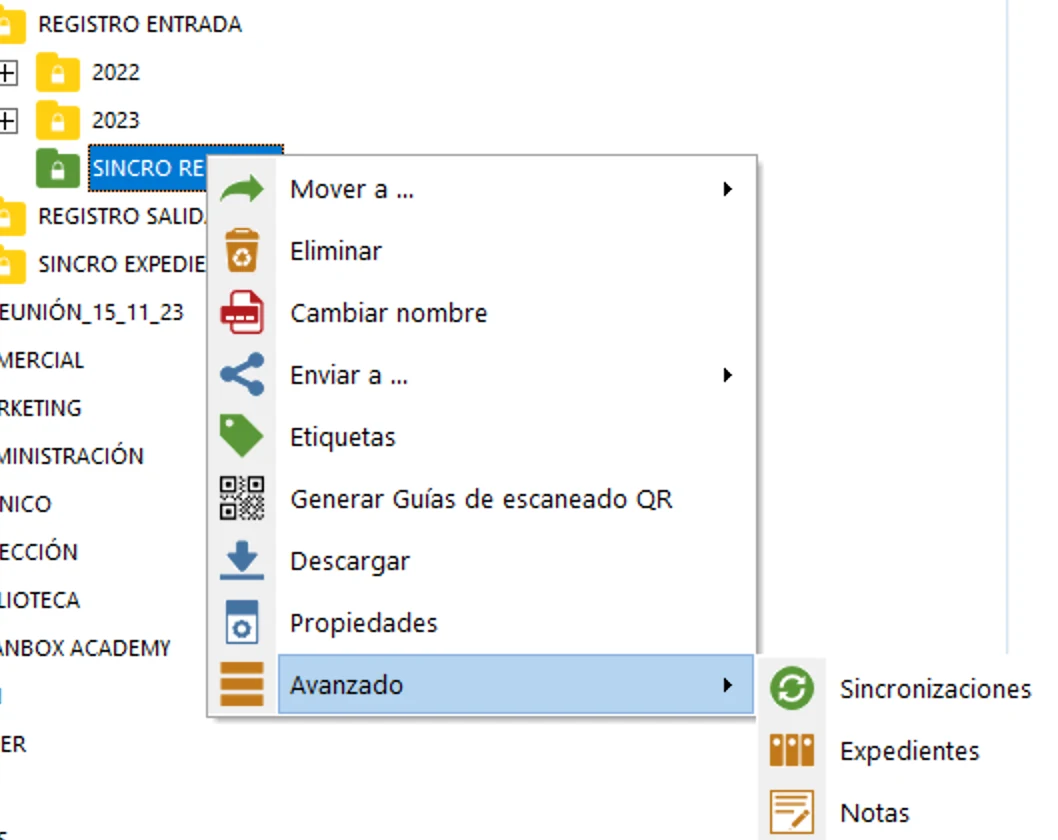
Folder menu in Avanbox Core (interface in Spanish), with the options to generate QR scanning guides and to manage synchronizations
A folder menu in Core: QR scanning guides and synchronizations. Interface shown in Spanish.
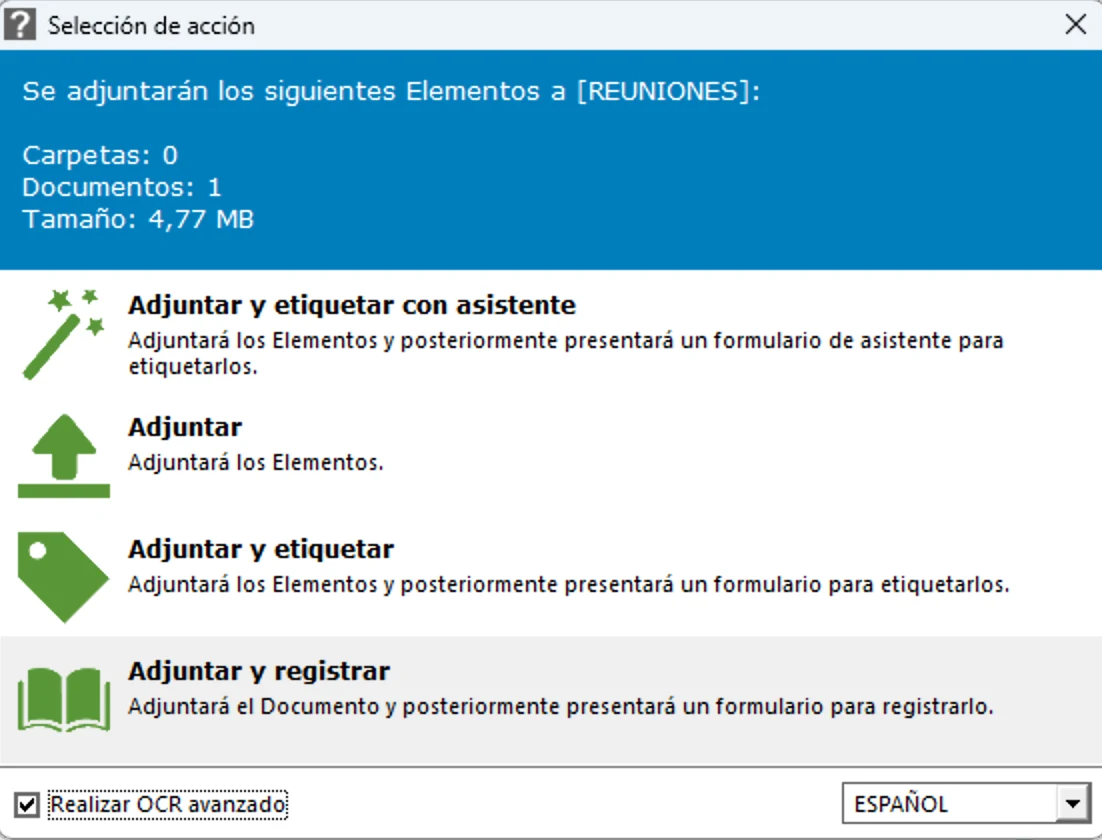
Avanbox Core window for attaching a document (interface in Spanish): attach, attach and tag, attach and register, with the text recognition box ticked
When you attach a document, Core can apply text recognition to it. Interface shown in Spanish.

Signature

Autofirma · FNMT · Spanish electronic ID
Situation
Documents that have to be signed with a certificate and that, in order to be signed, leave the place where they are filed.
What Avanbox does
Digital signature with Autofirma and a certificate (FNMT, Spanish electronic ID card) from within the document manager itself.
Result
The document is signed where it is stored, without leaving the document manager.
A document signed digitally with a certificate
Security and control

Every document, protected and with its history

Against the risk of leaks, of breaching data protection rules or of losing information, Avanbox protects every document and keeps a record of everything that is done with it.

  1. Encrypted on upload
  2. Access by permission
  3. Keeps its versions
  4. Everything is logged

Versions

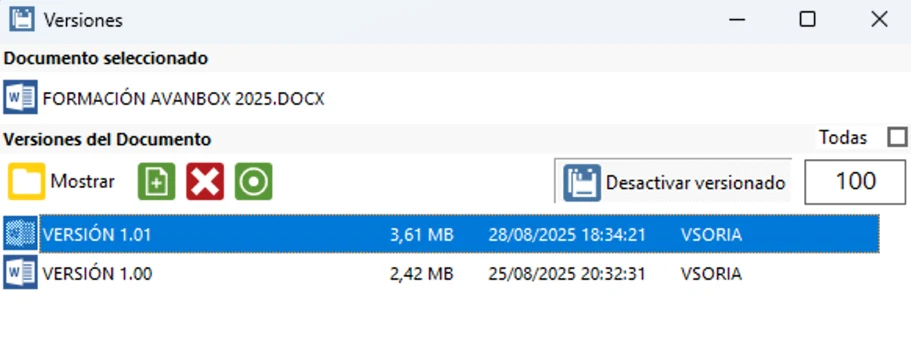
The versions of every document are kept: which is which, from when, and who saved it.

Versions window of a document in Avanbox Core (interface in Spanish): version 1.00 and version 1.01, with their size, date and the user who saved each one

Full audit trail

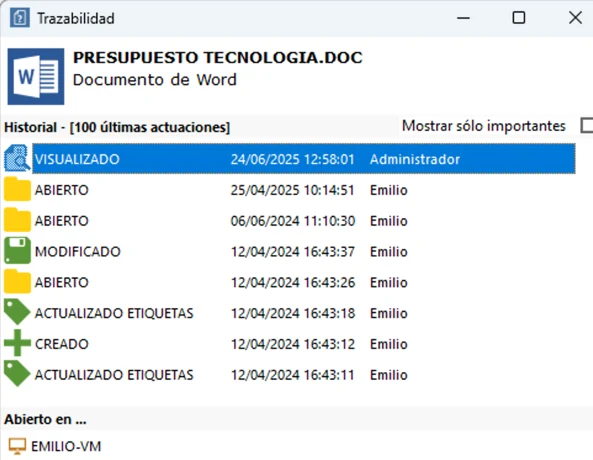
Who opened each document, who modified it, printed it or sent it. The history can be checked in the document itself.

Audit trail window of a document in Avanbox Core (interface in Spanish): history of actions (created, opened, modified, viewed, tags updated) with date, time and user
Why Avanbox

So the whole company can come in, without changing what already works

Customers

They trust us

Avanbox Ecosystem

Want to see it in action?

We'll show you Core, Nova and Astra in a demo for your company.

Request a demo → Download the brochure (PDF, Spanish)