Accounting firms · Avanbox IDEA

Software for accounting firms: stop chasing invoices every quarter.

Your clients upload their invoices to the portal as soon as they receive them, AI reads them and your team only reviews the doubtful ones. The quarter-end close stops being a race.

Avanbox IDEA = Nova + Astra + Core

Astra · Matching

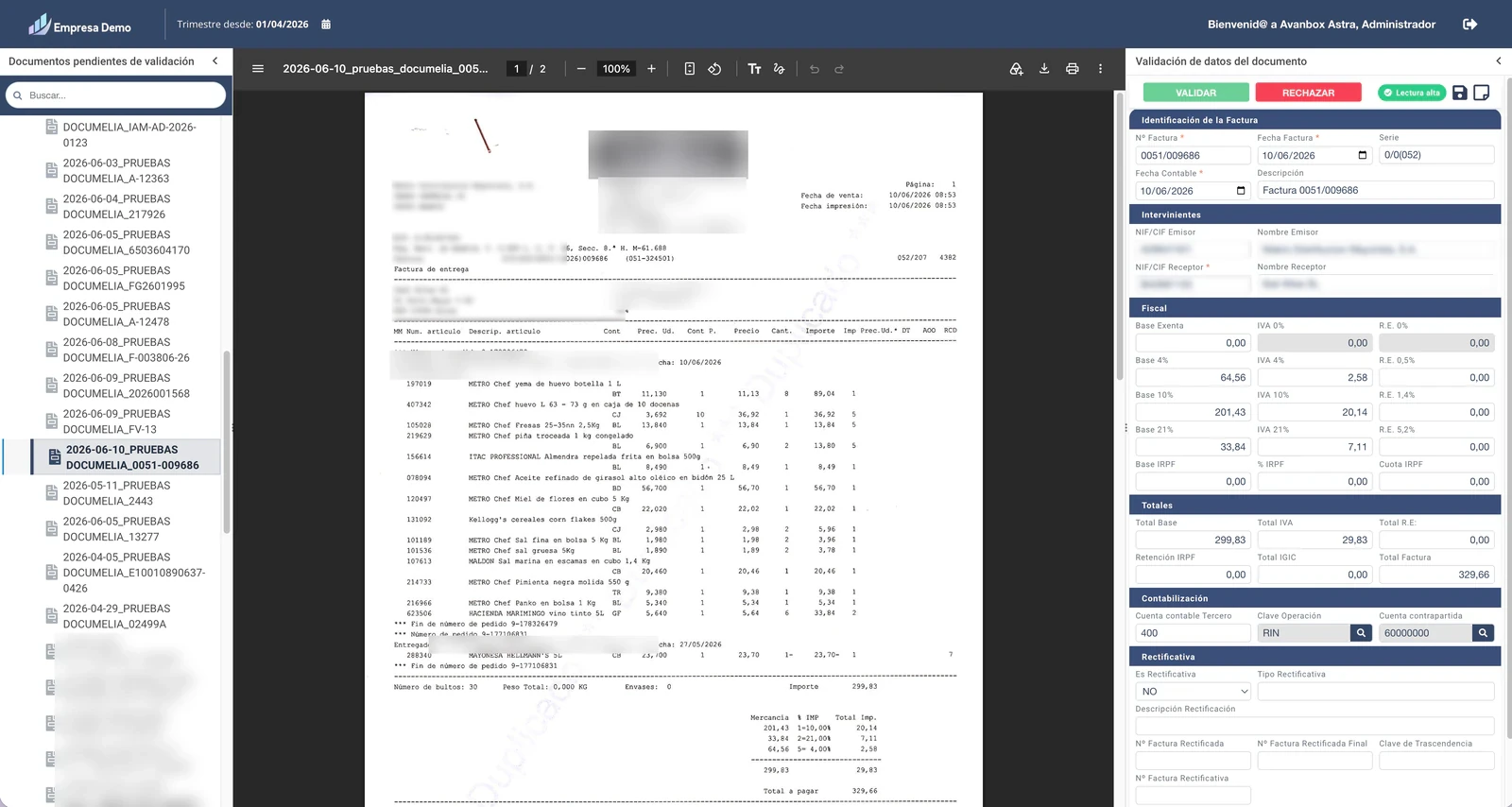
Avanbox Astra matching screen: the invoice on one side and the data read on the other

The quarter-end close

The peak doesn’t get faster: it disappears.

If your firm has 300, 400 or 500 clients, you already know the routine: every quarter, all their sales and expense invoices have to be entered into the accounts, and before that you have to get hold of them. Invoices arrive late and in batches, and the work piles up in the few days left before the tax returns are due.

With Avanbox IDEA, what changes is when the work gets done. The client uploads each invoice when they receive it, throughout the quarter, and the AI reads it right then. At the close, all that’s left is to validate the doubtful ones in the matching screen.

With Avanbox IDEA

  1. 01

    During the quarter

    The client uploads each invoice to the portal when they receive it: a photo from their phone or the PDF from their computer.

  2. 02

    At that very moment

    Two artificial intelligences read the invoice and Astra compares what they have read.

  3. 03

    At the close

    All that’s left is to validate the doubtful ones in Astra’s matching screen.

How it works · 01—06

Six short videos, from the photo to the bank.

Tap “Turn sound on” on any video to hear the explanation.

  1. 01Avanbox IDEA

    Snap it and done.

    Your client takes a photo of the invoice on their phone, or uploads up to 250 at once. If one PDF holds several, the AI splits them. No emails, no chasing: they're already at your firm.

  2. 02Avanbox IDEA

    Two AIs, one check.

    Two artificial intelligences read each invoice separately. Astra compares what they've read and shows you the invoice next to its data. Reviewing takes seconds.

  3. 03Avanbox IDEA

    Whitelist.

    If the client or supplier is on your whitelist and both AIs also agree, the invoice is posted automatically. Everything else you review in Astra. You decide what gets automated.

  4. 04Avanbox IDEA

    Bank reconciliation.

    Upload your bank statement in Norma 43 format and Avanbox matches every transaction with its invoice. What matches is reconciled. What doesn't, is flagged for you.

  5. 05Avanbox IDEA

    The portal works both ways.

    Your clients send you their invoices through the portal, and you send back what's theirs the same way. Drop everyone's tax returns, payslips and contracts into one folder: Avanbox recognises who each one belongs to and publishes it on their portal.

  6. 06Avanbox IDEA

    One notice for everyone.

    Send a notice to all your clients at once and see who has read it and who has accepted it. If needed, request a digital signature in the same message.

What’s included

Avanbox IDEA: three parts that work together.

Avanbox IDEA is the Avanbox pack, Documelia’s application, designed for accounting firms.

01Nova

Client portal

Nova, the portal with your clients, both ways.

  • Your client uploads their sales and expense invoices without waiting for you to ask: from their phone, by taking a photo, or from their computer.
  • Payslips, tax returns, contracts and any document you send them arrive in their portal, organised in folders.
  • Note chat on each document, to clear up questions about an invoice on the invoice itself.
  • Bulk messages with read and acceptance confirmation, and digital signature requests.
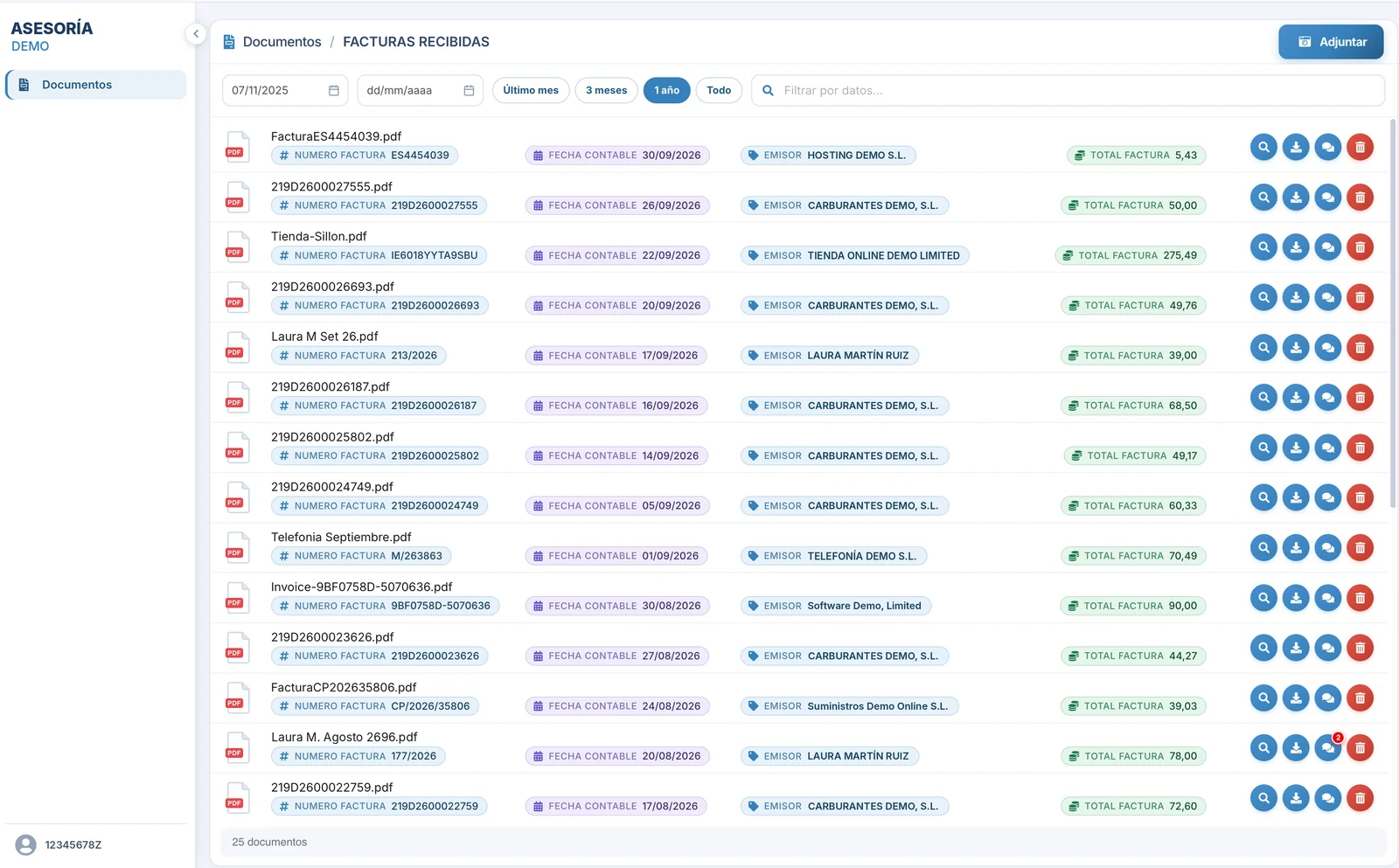
Avanbox Nova portal: list of received invoices with their number, accounting date, issuer and amount

02Astra

AI reading and matching

Astra reads, matches and reconciles.

  • Reading with two cross-checked artificial intelligences. OCR engine with Azure and OpenAI AI.
  • An invoice is only validated and posted automatically when the client or supplier is on your whitelist and both AIs agree. In any other case, you review it in the matching screen.
  • Bank reconciliation with the Norma 43 statement: the system proposes the invoice for each transaction and Astra generates the entries.
  • Automatic transfer to accounting:
    • SageSage 200 · Sage Despachos
    • a3ASESOR ecoa3ASESOR · a3innuva
    • DiamaconDiamacon
    • GeyceGeyce
    • ContaSolContaSol

    and other accounting software

Avanbox Astra invoice matching screen

03Core

Document management

Core files every document in its place.

  • Every document is filed in its client’s record.
  • Automatic filing with OCR and AI.
  • Automated records and workflows.
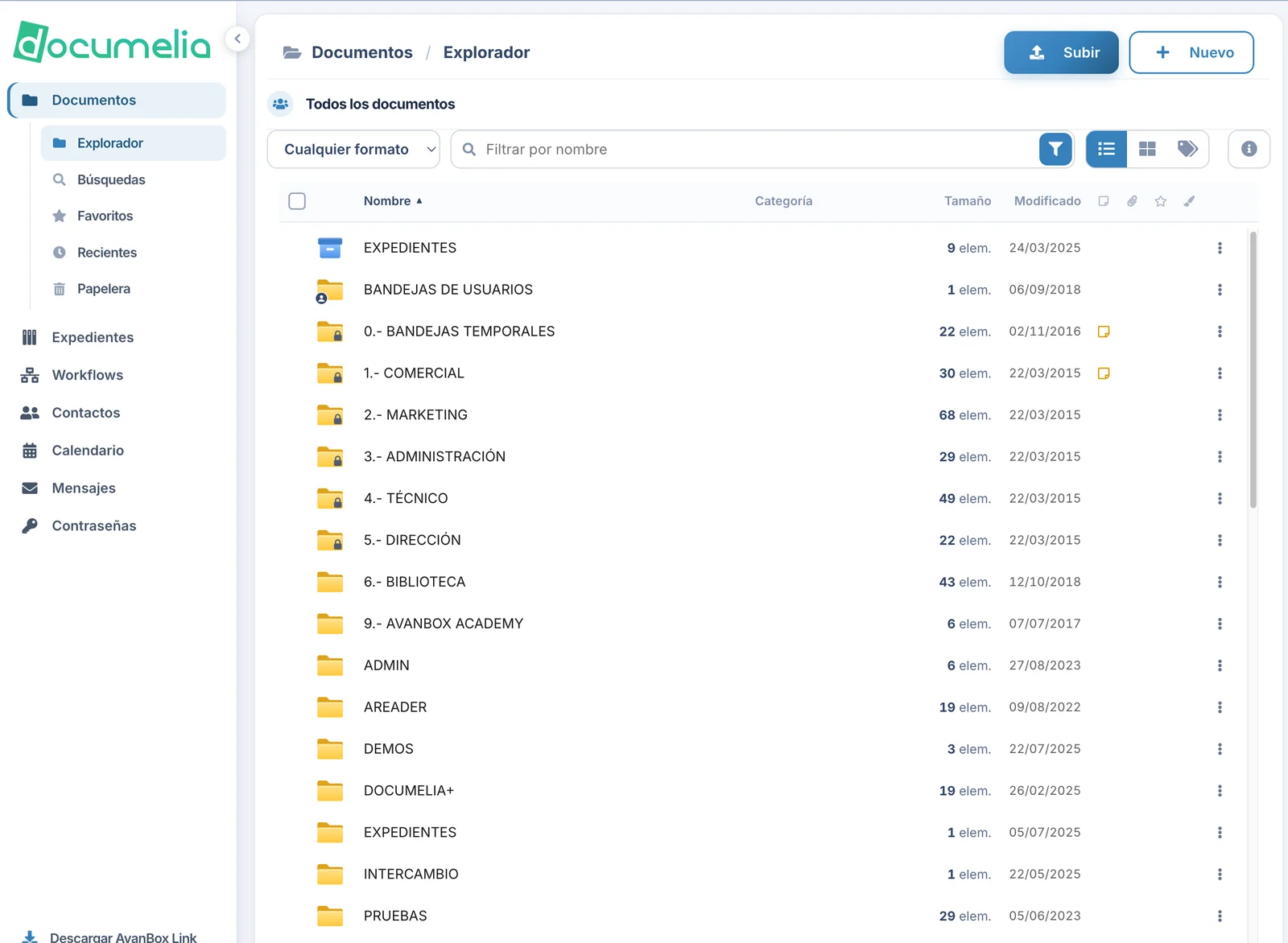
Avanbox Core explorer: the menu on the left and the company folders with their items and dates

Real data

What the tests and the clients say.

Test

In a test with 7,200 invoices in different formats, only 6 needed manual review.

«Documelia has reduced our staffing costs by 85% by automating all the accounting for our clients — I recommend them without any hesitation.»
MAS ASESORESAccounting firm

Calculator

How much do you save?

Fill in your firm’s details. The result updates instantly. Prices exclude VAT.

Your firm

Deployment

Time you spend today on other tasksOptional. If you leave it empty, it doesn’t count.
Quarter-end peaksOptional. If you leave it empty, it doesn’t count.

Peak-time hours are already included in the cost of entering invoices. Only what you pay on top counts here: the overtime premium and temporary staff.

For reference: the legal limit is 80 hours of overtime per worker per year (art. 35.2 of the Spanish Workers’ Statute) and recording working hours is mandatory (art. 34.9). With IDEA the work is spread over the quarter and this cost drops to zero.

What an employee costs that isn’t on the payslipOptional. Amounts in € per year per position.

The total is multiplied by the full-time people the time you get back is equivalent to. In addition, the Spanish collective agreement for administrative agencies sets a 3% pay rise for 2026, while the IDEA fee is only revised in line with the CPI (this is not included in the calculation).

AdvancedCalculation parameters. You can change them.

How we calculate it: your invoices × 4 minutes are today’s working hours; with IDEA you only review the doubtful ones. We compare what those hours cost with what IDEA costs.

Net savings, first year€23,553

From the second year€23,953

Time you get back188 hours a month

Hours per year by hand2,400
Hours per year with IDEA150
Equivalent to1.3 full-time people
Cost of one working hour
Gross annual salary
€20,000
Employer social security (32.15%)
€6,430
Total cost to the company
€26,430
Cost per hour
€14.85
Line-by-line breakdown
By hand, per year
Entering invoices by hand36,000 invoices · 2,400 h€35,636
Total by hand€35,636
With IDEA, per year
Review in the matching screen150 h€2,227
Avanbox IDEA fee€649 per month × 12€7,788
Cloud hosting€588
AI readingfrom €30 per 1,000 invoices€1,080
Total with IDEA€11,683
Savings
Annual savings (by hand − with IDEA)€23,953
Set-up, first year only1 day × €400−€400
Net savings, first year€23,553

Indicative estimate based on the data entered. Prices exclude VAT. We work out the exact figures for your firm in the free consultation.

Free consultation

Avanbox IDEA prices (excluding VAT)

Up to 100 clients on the portalfrom €349 per month
Up to 250 clientsfrom €449 per month
Up to 500 clientsfrom €649 per month
Over 500 clients: for each additional 100 or part thereoffrom €90 per month
AI reading, all invoicesfrom €30 / 1,000

Deployment

Cloud: hostingfrom €49 per month
Cloud: set-up1 day
On-premise: maintenance on the fee15%
On-premise: set-up2 days
Set-up dayfrom €400

Three worked examples

Cloud, 30 invoices per client per quarter, salary of €20,000, without the optional sections.

100clients

Annual cost by hand
€11,879
Annual cost with IDEA
€5,878
Equivalent to
14 hours a week
Time you get back
63 hours a month
Net savings, first year
€5,600
From the second year
€6,000

250clients

Annual cost by hand
€29,697
Annual cost with IDEA
€8,732
Equivalent to
1.1 full-time people
Time you get back
156 hours a month
Net savings, first year
€20,565
From the second year
€20,965

500clients

Annual cost by hand
€59,393
Annual cost with IDEA
€13,888
Equivalent to
2.1 full-time people
Time you get back
313 hours a month
Net savings, first year
€45,105
From the second year
€45,505

Beyond the calculator

What the numbers don’t show.

Some things have no price in the calculator, but your firm and your clients notice them.

  • Portal always open

    At any hour, on any day. Your client uploads their invoices when it suits them, without waiting for your office hours.

  • A photo from the phone

    The client uploads the invoice by taking a photo of it. No scanner or computer needed.

  • Duplicate filter

    If your client uploads the same file several times, the copies are discarded automatically. You don’t have to look for repeats.

  • Tax returns and payslips, published automatically

    You drop the documents in a folder; Avanbox recognises who each one belongs to and publishes it on their portal.

  • Digital signature

    Request a signature on a document from the portal itself, without paper going back and forth.

  • Unlimited users for the firm

    Your whole team works in Avanbox IDEA, without paying for each user at the firm.

And the strain on the team.

At firms where every close means working weekends, people end up leaving. Spreading the work over the quarter is also a way of looking after the team you already have.

Shall we look at it with your firm’s figures?

In the free consultation we show you Nova, Astra and Core and work out the exact figures for your firm.

Contact

Let us help you.

Tell us what you need. A specialist will get back to you personally.

Who is writing? *

Controller: Documelia Gestión Documental, S.L. Purpose: to answer your enquiry. Legal basis: your consent. We do not share your data. You can exercise your rights by writing to info@documelia.com. More information in the privacy policy.